Cost Lines
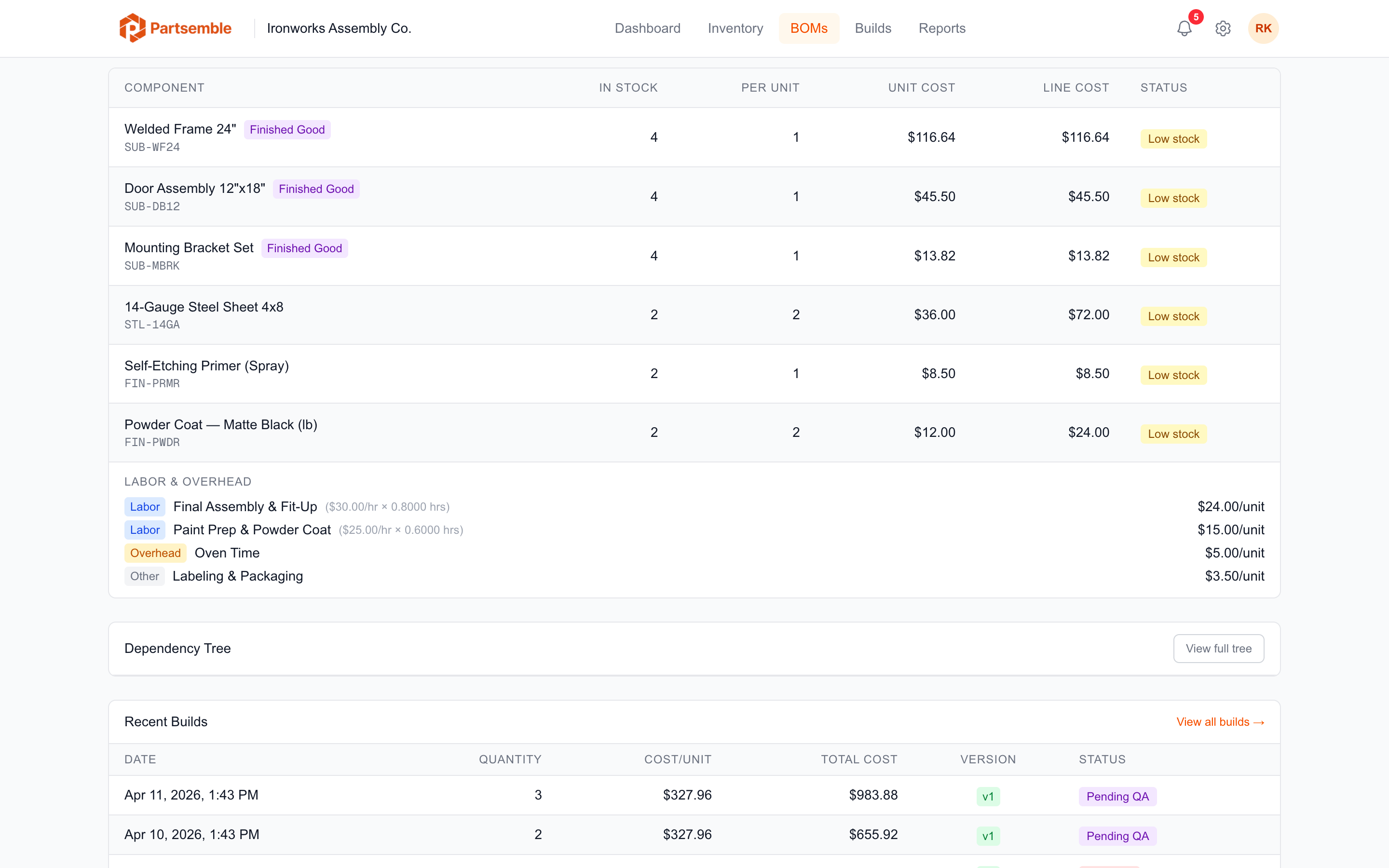
Not all production costs come from materials. Labor, machine time, testing, and packaging overhead are real costs that should be reflected in your finished good's unit cost. Cost lines let you capture these non-material expenses on a BOM.
What Is a Cost Line?
A cost line is an additional cost entry on a BOM that doesn't consume inventory. It represents a fixed dollar amount per unit built. When you execute a build, each cost line is added to the total build cost alongside the material costs from component consumption.
Cost Line Fields
Each cost line has the following:
Cost type — one of three categories:
- Labor — direct labor costs (assembly time, machine operator hours, QC inspection)
- Overhead — indirect costs (facility allocation, equipment depreciation, utilities)
- Other — anything else (testing fees, certification costs, special packaging)
Label — a descriptive name (e.g., "Assembly Labor", "QC Testing", "Machine Time").
Cost per unit — the dollar amount added per unit built. You can enter this directly, or calculate it from a rate and quantity (see below).
Rate and quantity per unit (optional) — for rate-based costs, enter an hourly rate and the hours per unit. Partsemble calculates the cost per unit automatically. For example, if assembly labor is $25.00/hour and each unit takes 0.5 hours, the cost per unit is $12.50.
Adding Cost Lines
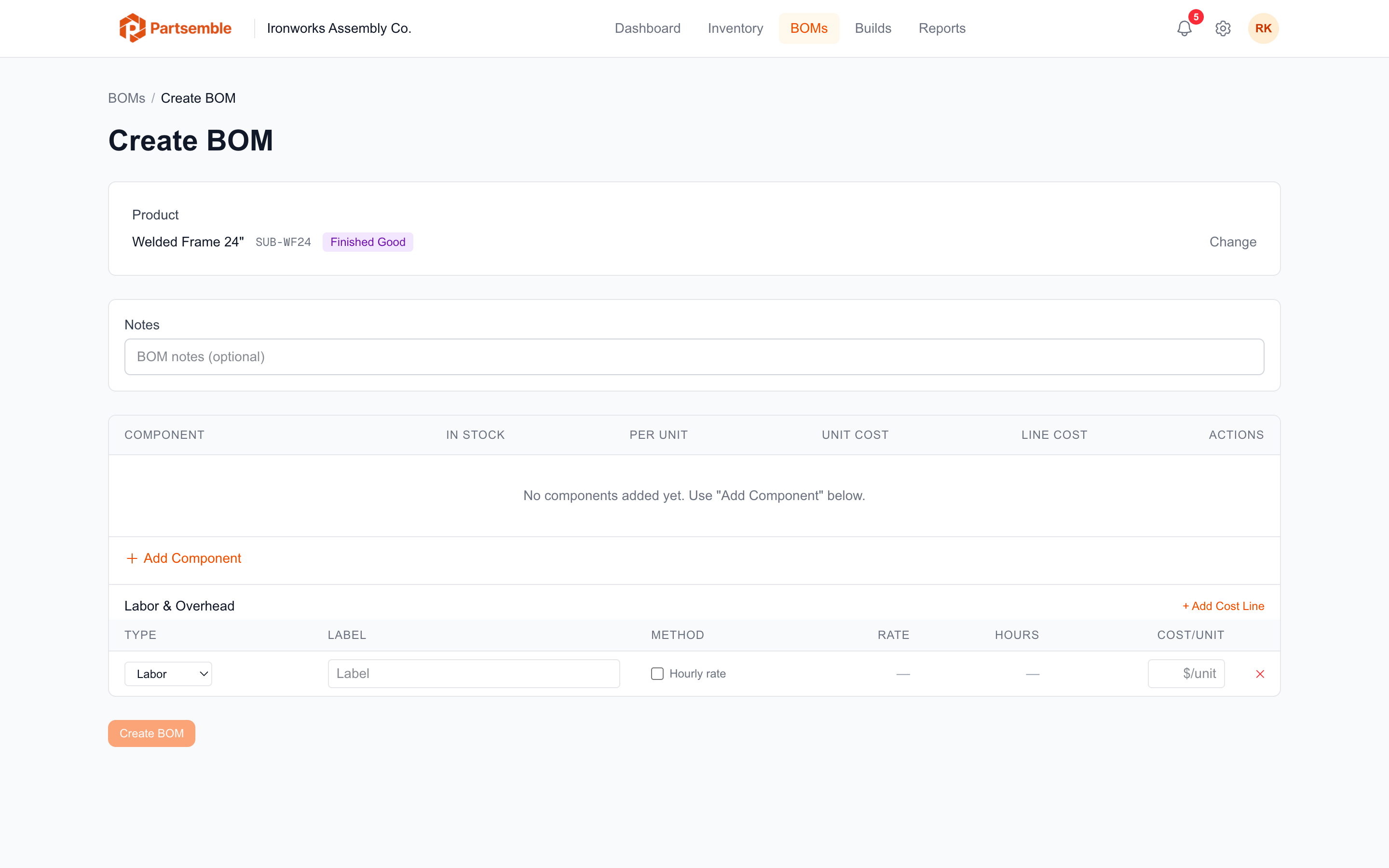
When creating or editing a BOM, click Add Cost Line below the component list. Fill in the type, label, and cost. Add as many cost lines as you need — there's no limit.
Fixed vs. Rate-Based Entry
Fixed: Enter the cost per unit directly. Use this when you know the flat cost per unit — for example, a $2.00 packaging fee per item.
Rate-based: Enter the rate ($/hour or $/unit of service) and the quantity per unit (hours or service units per finished good). Partsemble multiplies them to get the cost per unit. Use this when you think in terms of hourly rates — for example, $30.00/hour x 0.25 hours/unit = $7.50/unit.
Both approaches produce the same result: a cost per unit that's applied to every unit built.
How Cost Lines Affect Builds
When a build executes, each cost line contributes to the total build cost:
total build cost = (sum of material costs) + (sum of cost lines x quantity built)
For example, building 10 units with $20 in materials per unit and $5 in cost lines per unit produces a total build cost of $250. The finished good's unit cost is $25.
Cost lines are recorded on each build as build cost lines, capturing the exact cost per unit at the time of execution. This preserves the audit trail even if you later change the BOM's cost lines.
Example
A small electronics assembler has this BOM for a sensor module:
| Type | Label | Rate | Qty/Unit | Cost/Unit |
|---|---|---|---|---|
| Labor | Assembly | $28.00/hr | 0.75 hr | $21.00 |
| Labor | QC Testing | $28.00/hr | 0.25 hr | $7.00 |
| Overhead | Facility | — | — | $3.50 |
| Other | Calibration Certificate | — | — | $1.50 |
Total cost lines: $33.00 per unit. This gets added to the material cost from components to arrive at the full unit cost of the finished good.
Cost lines don't need to be precise to the penny on day one. Start with reasonable estimates and refine them over time. Even approximate cost lines produce much better unit costs than ignoring labor and overhead entirely.