Nested BOMs
When a component in a BOM is itself a product with its own BOM, you have a nested (or multi-level) BOM. This is common in manufacturing — you build sub-assemblies from raw materials, then use those sub-assemblies as components in a finished good.
How Nesting Works
Any product that has an active BOM and is used as a component in another BOM creates a nested relationship. Partsemble detects this automatically.
For example, a electronics manufacturer might have:
Level 1 — Finished Good: Sensor Kit
- Circuit Board (sub-assembly) x 1
- Enclosure x 1
- Cable Harness x 1
Level 2 — Sub-Assembly: Circuit Board
- PCB Blank x 1
- Resistor Pack x 3
- Capacitor x 5
- LED x 2
The Sensor Kit BOM references the Circuit Board as a component. The Circuit Board has its own BOM with its own components. This creates a two-level nested BOM.
Nesting can go deeper — a component of the Circuit Board could itself be a sub-assembly with its own BOM. Partsemble supports up to 10 levels of nesting.
Viewing the Component Tree
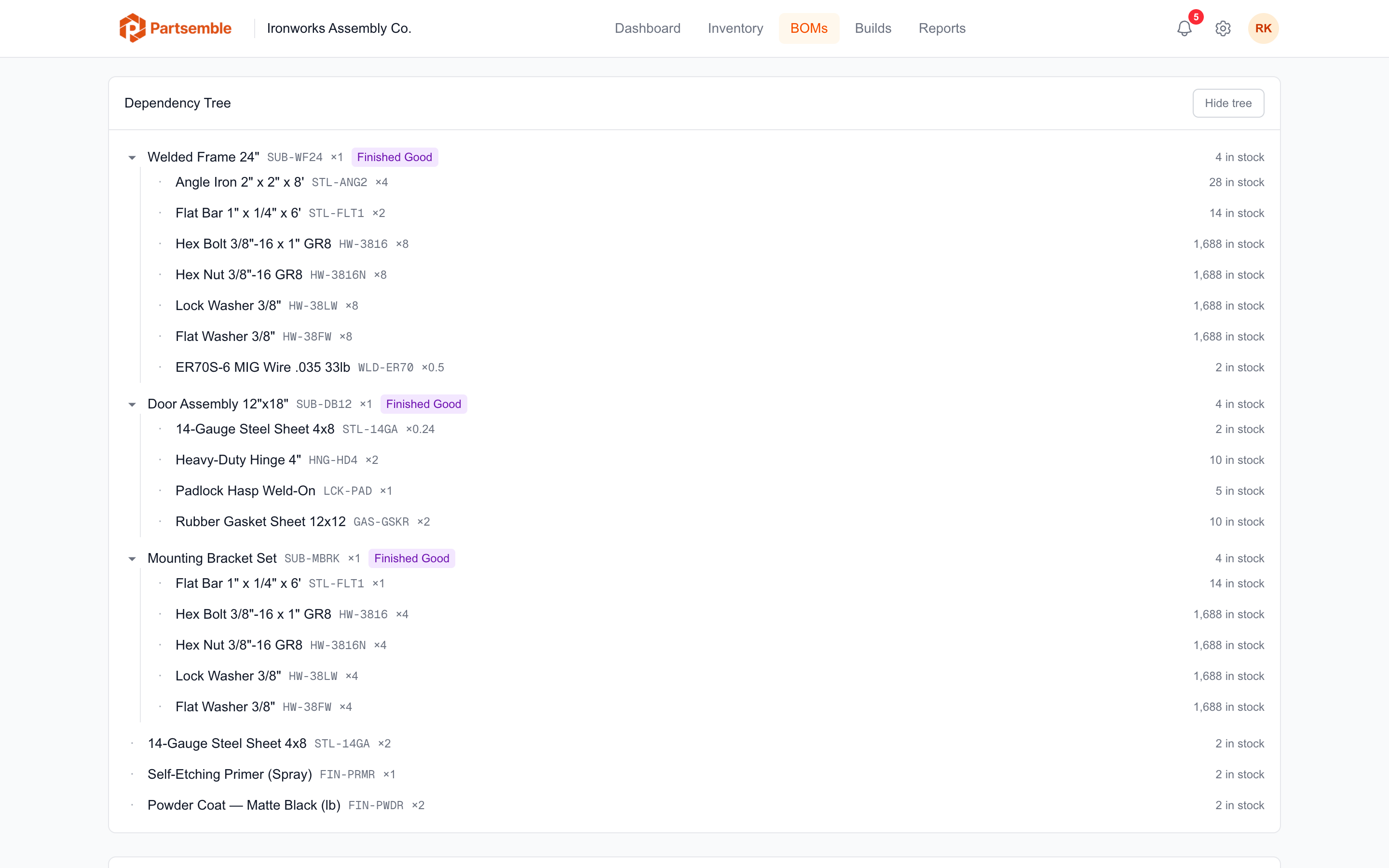
On any BOM detail page, the Component Tree section shows the full hierarchy. Sub-assembly components are expandable — click the toggle to see their child components.
The tree view shows each component's quantity, current stock, and unit cost at every level. This gives you a complete picture of everything that goes into the finished good, not just the direct components.
Cost Rollup
Nested BOMs support cost rollup — the ability to see the total cost of a finished good including the costs of building its sub-assemblies.
The BOM detail page shows two cost figures:
Direct cost — the sum of immediate component costs at their current unit cost. This is what you'd pay if all sub-assemblies were already built and in stock.
Recursive cost — the fully expanded cost that replaces each sub-assembly's unit cost with the cost of building it from its own components. This reflects the true raw-material cost of the finished good.
The difference between these numbers shows how much value is added at each level of assembly.
Building Nested Products
Partsemble does not automatically build sub-assemblies when you build a finished good. Each level is built independently.
The typical workflow for nested BOMs:
- Build the sub-assemblies first (increasing their stock on hand)
- Build the finished good (consuming the sub-assemblies as components)
You can plan this sequence using the Build Queue — create planned builds for sub-assemblies first, then the finished good, and execute them in order.
Set build points on your sub-assembly BOMs so Partsemble automatically creates planned builds when sub-assembly stock gets low. This keeps your intermediate inventory ready for final assembly.
Circular Reference Protection
Partsemble prevents circular references at any depth. If product A uses B, and B uses C, then C cannot use A (or B). This check runs automatically when you add components to a BOM and blocks the save if a cycle would be created.
The check applies to active BOMs only — archived BOM versions don't participate in the circular reference detection.
Example: Metal Fabrication
A metal fab shop builds a 24" industrial enclosure with three sub-assemblies:
Welded Frame 24" (sub-assembly)
- 2" Angle Iron x 4
- Flat Bar 1" x 2
- Hex Bolt 3/8" x 8
- MIG Welding Wire x 0.5
Door Assembly 12"x18" (sub-assembly)
- 14-Gauge Steel Sheet x 0.25
- Heavy-Duty Hinge 4" x 2
- Rubber Gasket Sheet x 2
- Padlock Hasp x 1
Mounting Bracket Set (sub-assembly)
- Flat Bar 1" x 1
- Hex Bolt 3/8" x 4
- Hex Nut 3/8" x 4
Industrial Enclosure 24" (finished good)
- Welded Frame 24" x 1
- Door Assembly 12"x18" x 1
- Mounting Bracket Set x 1
- 14-Gauge Steel Sheet x 2
- Powder Coat — Matte Black x 2
The component tree for the Industrial Enclosure shows all three levels. The recursive cost includes the raw material costs of angle iron, flat bar, steel sheet, hinges, and hardware — not just the unit cost of each sub-assembly.