Stock Tracking
Partsemble tracks the stock on hand and unit cost for every product. This article explains how stock quantities change, how costs are calculated, and how to read the transaction history.
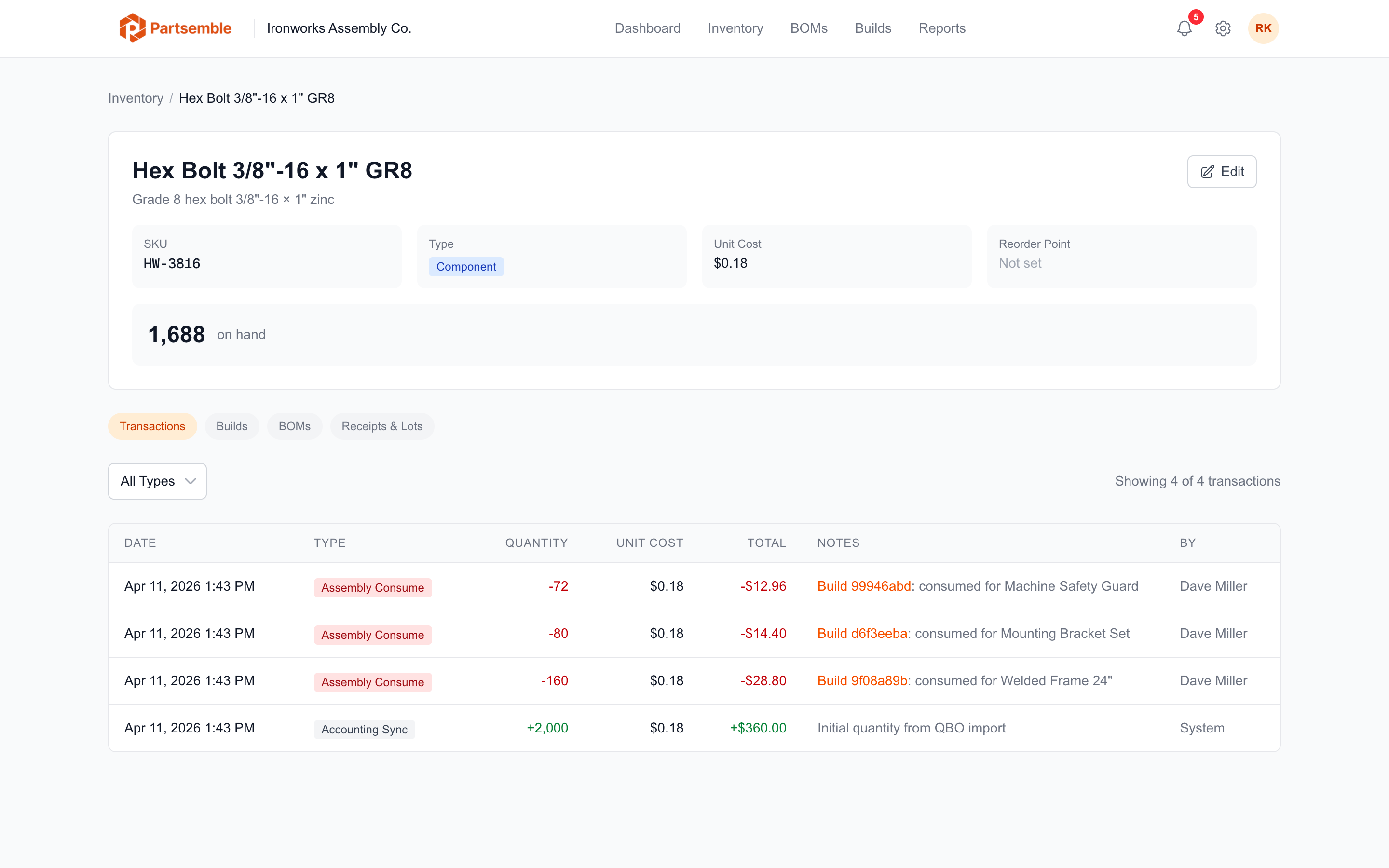
How Stock Changes
Stock on hand is updated automatically whenever something happens that affects inventory. You never need to manually recalculate totals — Partsemble maintains the running balance.
Here are the events that change stock:
Build execution — when you execute a build, component stock decreases by the quantities defined in the BOM, and the finished good's stock increases by the quantity built.
Receiving (Advanced plan) — when you confirm a receipt, the received product's stock increases by the quantity on the receipt.
Sales (Advanced plan) — when a sale is synced or recorded, the sold product's stock decreases by the quantity sold.
Accounting sync — when you import items from your accounting system with existing quantities, Partsemble creates an initial stock transaction to establish the starting balance.
Adjustments — manual stock adjustments (for corrections, physical counts, received shipments, or write-offs) increase or decrease stock as needed. When receiving is enabled, corrections go through lot adjustments instead.
Every one of these events creates a stock transaction — an immutable record of what changed, when, why, and by how much.
Understanding Unit Cost
Partsemble uses weighted average costing (WAC) to track the cost of each product. The unit cost displayed on a product represents the average cost per unit across all inventory on hand.
The formula is straightforward: take the total cost of all units that have entered inventory (through purchases, receipts, or production) and divide by the total number of units.
For raw materials and components, unit cost is driven by purchase prices. If you buy 100 units at $5.00 and then 50 more at $6.00, your weighted average cost becomes $5.33 per unit.
For finished goods, unit cost is calculated at build time. When you execute a build, the finished good's cost equals the sum of all consumed components (at their current weighted average cost) plus any cost lines on the BOM (labor, overhead, etc.). This cost is then folded into the product's weighted average.
Only incoming transactions (purchases, production, receipts) affect the weighted average cost. Consumption events (builds consuming components, sales) use the current WAC but don't change it.
Transaction History
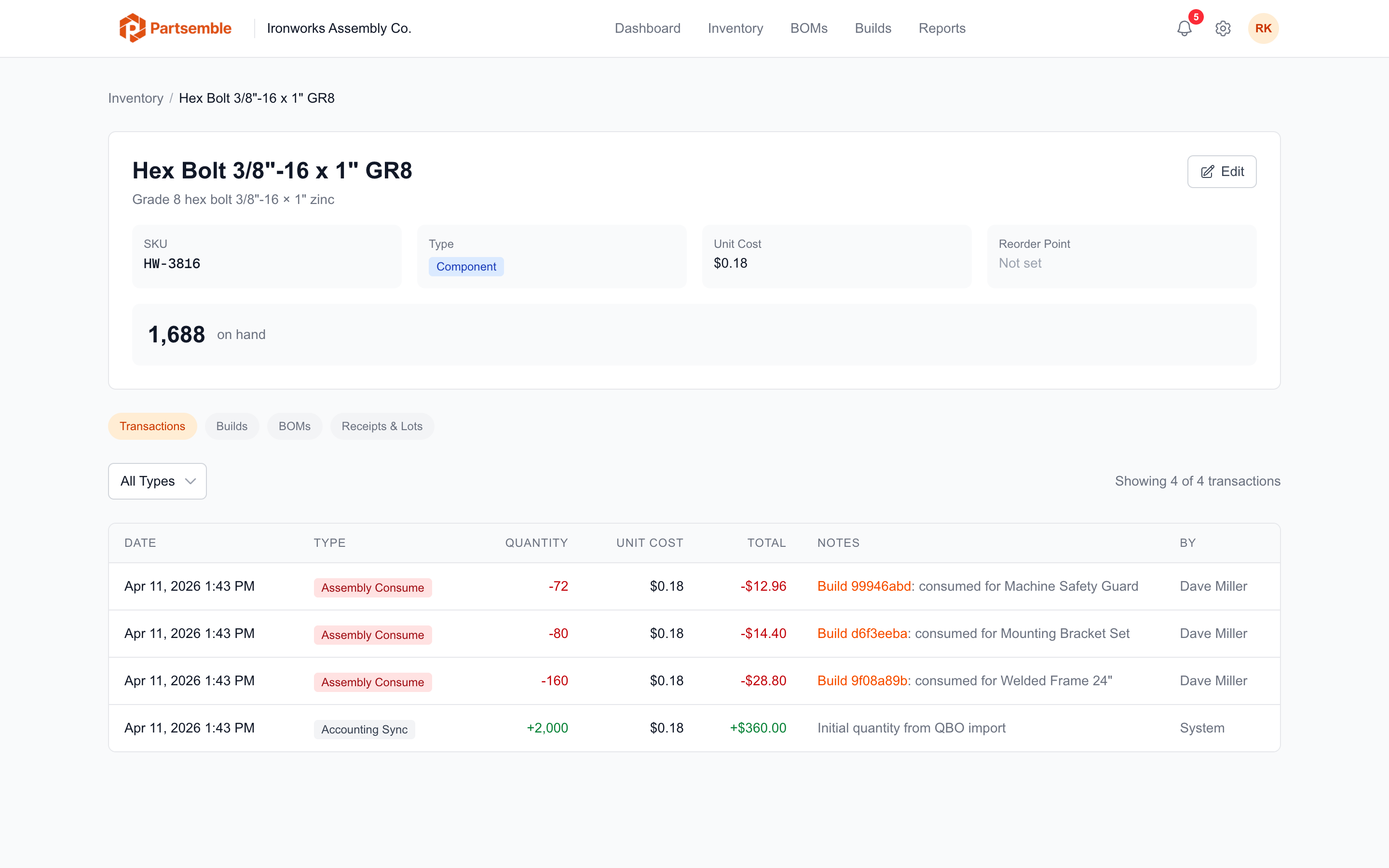
Every product has a complete transaction history that you can view on the product detail page. Navigate to Products, click on any product, and scroll to the Transaction History section.
Each transaction record shows:
- Date — when the transaction occurred
- Type — what caused the change (build consumption, build production, purchase, receipt, adjustment, etc.)
- Quantity — the amount added (positive, shown in green) or removed (negative, shown in red)
- Unit Cost — the cost per unit at the time of the transaction
- Total — the total cost impact of the transaction
- Notes — additional context, often linking to the build or receipt that created the transaction
- Created By — the user who triggered the action
You can filter the transaction list by type to focus on specific kinds of activity — for example, showing only assembly consumption to see how quickly a component is being used up.
The transaction history is an immutable ledger. Transactions are never edited or deleted — corrections are made by creating new adjustment transactions. This gives you a complete audit trail of every inventory movement.
Stock on the Product List
The main Products page shows stock on hand for every product. Products at or below their reorder point are highlighted so you can spot low-stock situations at a glance.
The product detail page shows the current stock on hand prominently at the top, along with the unit cost and product type.
Where Used
The product detail page also includes a Where Used section that shows every BOM that uses this product as a component. This is useful for understanding the downstream impact of a stock shortage — if a raw material is running low, you can quickly see which finished goods will be affected.