Build Assignments
Build assignments let you designate who is responsible for executing each planned build. This is useful when multiple team members work in production and you want clarity on who is doing what.
Build assignments require the Pro plan or above. The build assignment feature must be enabled in Settings → Business Settings.
Enabling Build Assignments
Navigate to Settings → Business Settings and turn on Build Assignment. Once enabled, planned builds can be assigned to team members.
When build assignment is enabled, a planned build must be assigned to someone before it can be executed. If you try to execute an unassigned build, Partsemble shows an error asking you to assign it first.
If you disable build assignment later, the requirement is removed — unassigned builds can be executed normally again. Existing assignments are preserved but no longer enforced.
Assigning a Build
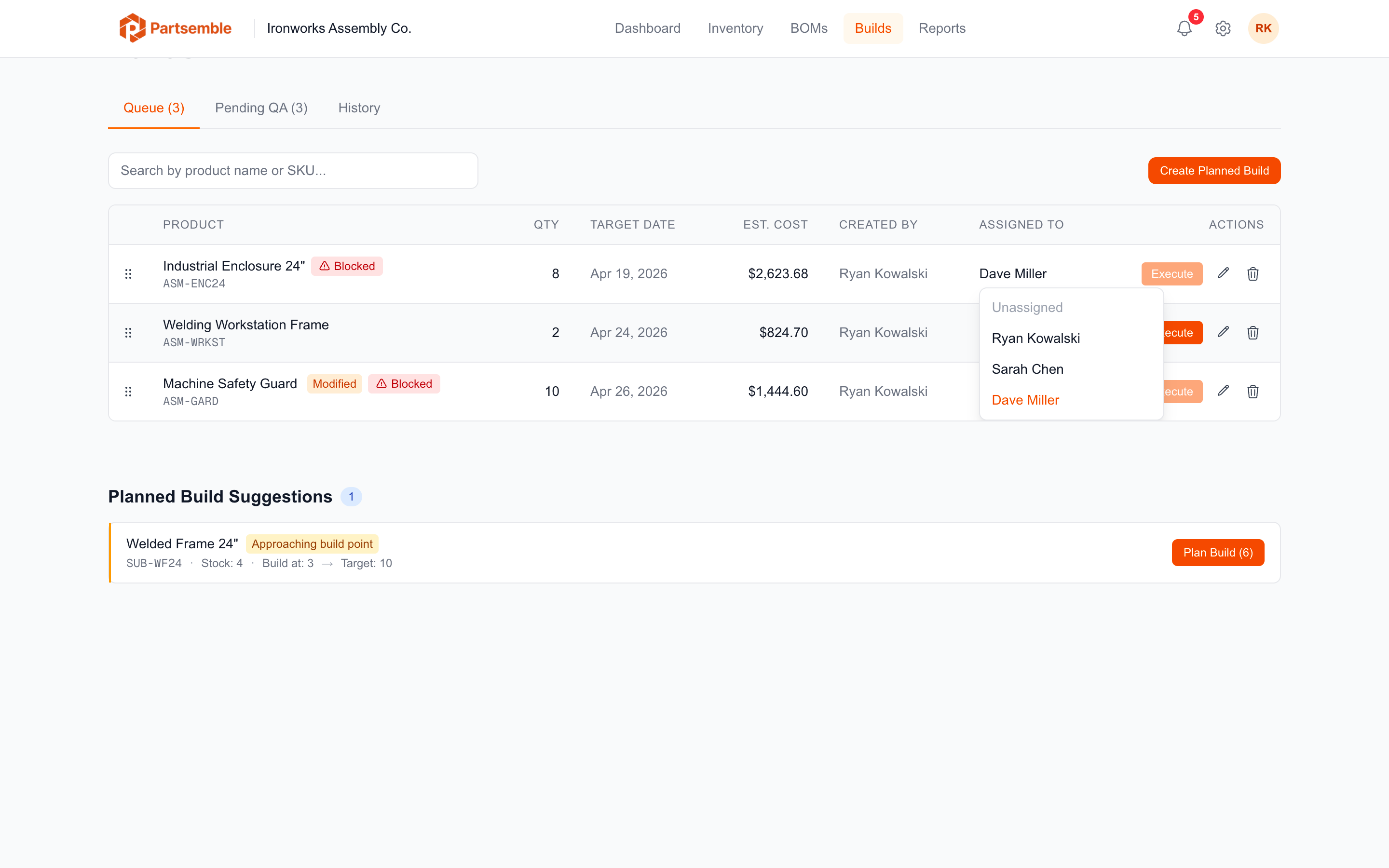
You can assign a build in two places:
When creating a planned build — select a team member from the Assigned to dropdown during creation.
From the build queue — edit any planned build and set or change the assigned team member.
The assignment dropdown shows all active members of your Partsemble account. Only users who have been invited and accepted their invitation appear in the list.
How Assignments Work in Practice
A typical workflow with build assignments:
- A production manager creates planned builds for the day and assigns each to a team member
- Each team member opens the build queue and filters or views their assignments
- The assigned person opens their build, reviews the preview, and executes it
- The build records who executed it (which may differ from who it was assigned to, depending on permissions)
Assignments are about planning and accountability, not access control. Any team member with build execution permissions can execute any planned build, even one assigned to someone else. The assignment tracks intent; the execution log tracks who actually ran it.
Assignments and Auto-Generated Builds
Builds auto-generated from build points are created without an assignment. If build assignment is enabled, someone needs to assign them to a team member before they can be executed.
Build Detail Tracking
The build detail page shows both the assigned user and the executing user:
- Assigned to — the team member the build was assigned to during planning
- Executed by — the team member who actually ran the build
- Reviewed by — the team member who approved or rejected the build (if QA is enabled)
This gives you a complete chain of responsibility for every build.