Roles & Permissions
Partsemble uses role-based access control to manage what each team member can see and do. Every member has a role, and each role has a configurable set of permissions.
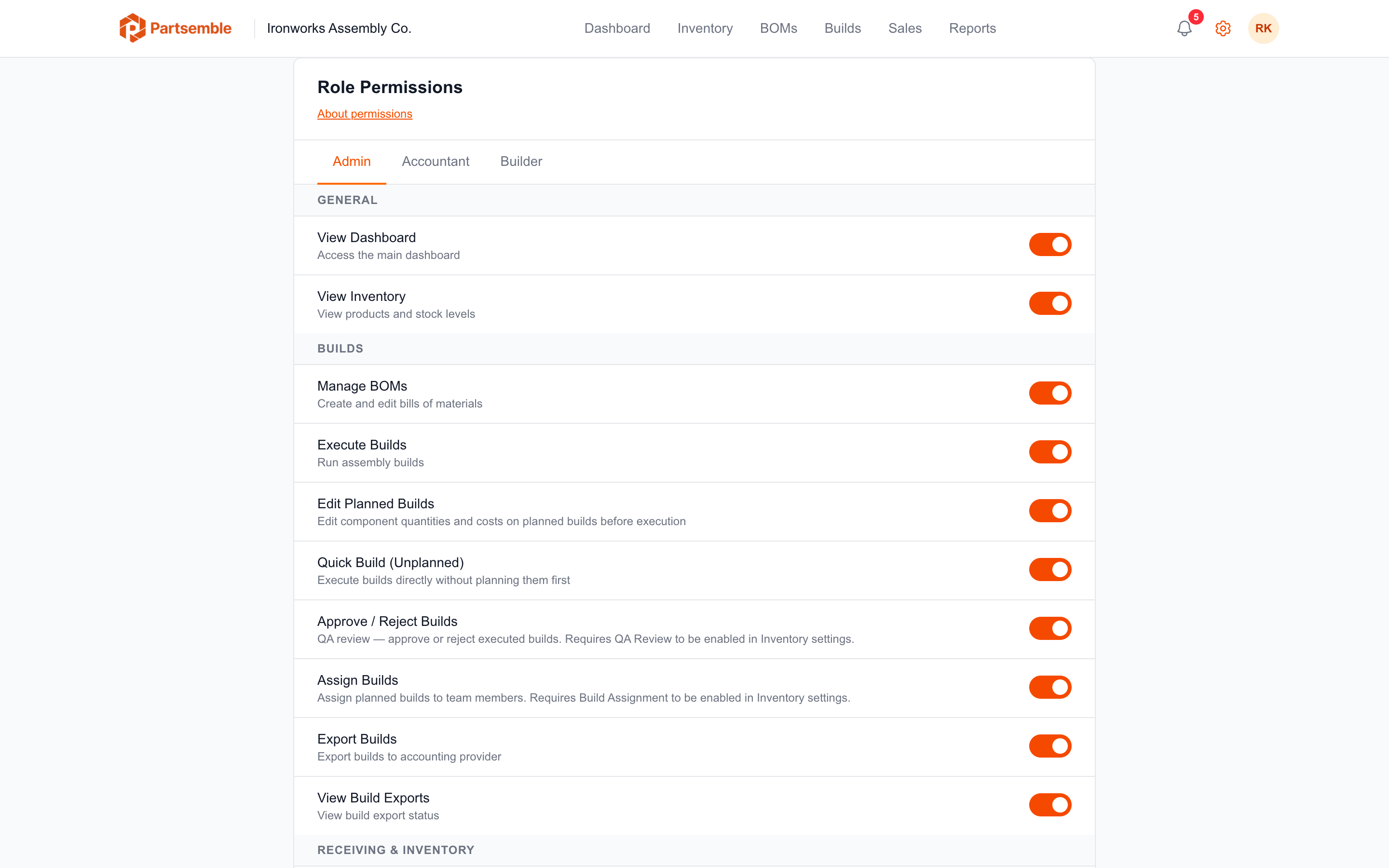
Roles
Owner — full access to everything. There is exactly one owner per business. The owner always has all permissions granted — this cannot be changed. Only the owner can cancel the service.
Admin — broad access by default, suitable for managers or co-owners who need to configure settings, manage the team, and oversee operations. Admins can do most things the owner can, except cancel the service.
Accountant — focused on financial and integration tasks. Default access to syncing, importing, exporting, and viewing inventory. No team management or QA approval access by default.
Builder — focused on production. Default access to viewing inventory, managing BOMs, executing builds, and viewing the dashboard. Limited access to settings and exports by default.
Customizing Permissions
Permissions are fully customizable per role per business. Navigate to Settings → Permissions to see the current permission matrix. Toggle individual permissions on or off for any role.
Only users with the manage_team permission can modify permissions. The owner can modify permissions for all roles. Admins can modify permissions for Accountant and Builder roles, but not for other Admins.
Permission Reference
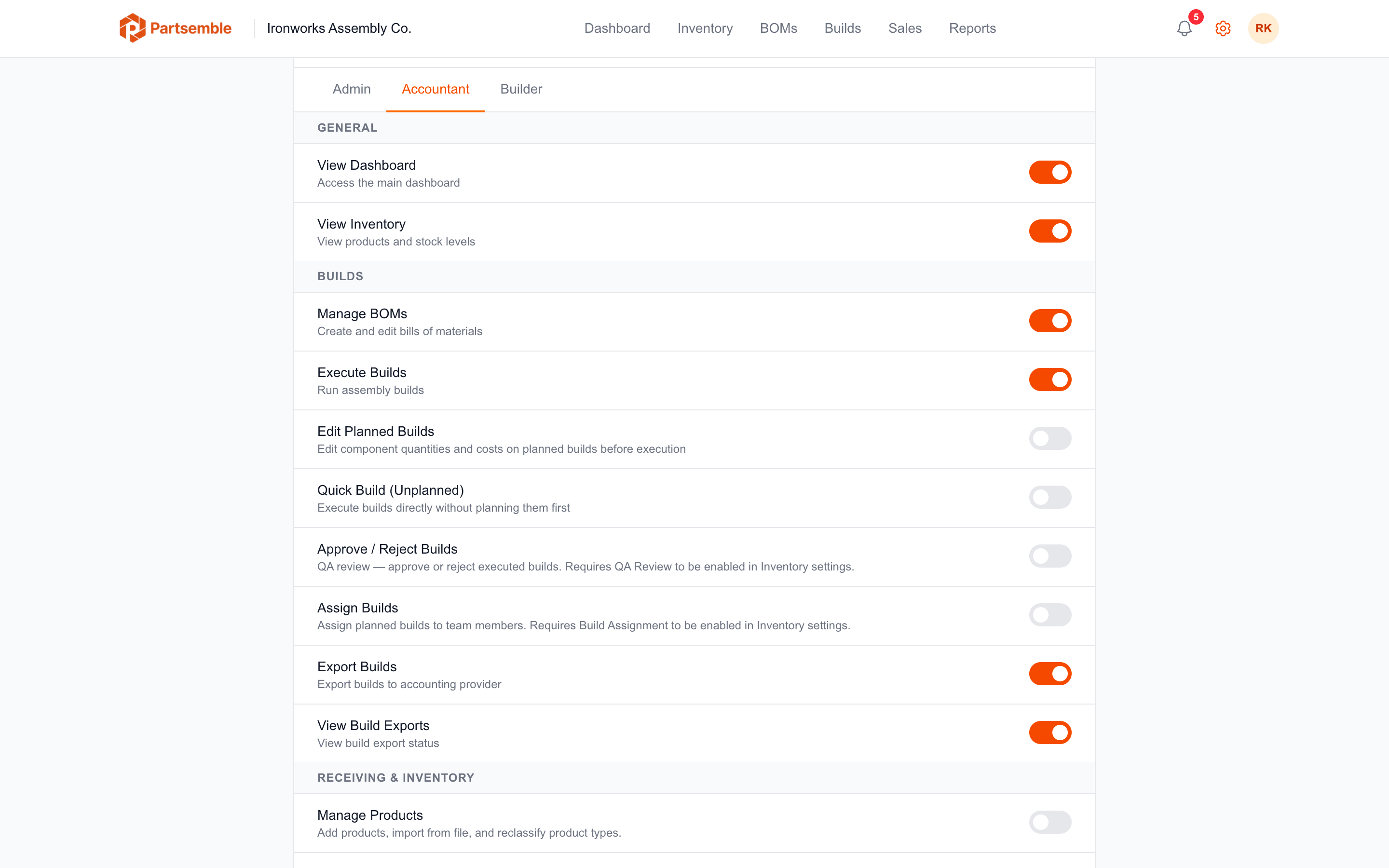
Billing & Service
| Permission | Description | Admin | Accountant | Builder |
|---|---|---|---|---|
| Manage Billing | Access billing settings and payment methods | Yes | No | No |
| Cancel Service | Cancel the Partsemble subscription | Owner only | Owner only | Owner only |
Team & Settings
| Permission | Description | Admin | Accountant | Builder |
|---|---|---|---|---|
| Manage Team | Invite, remove, and change member roles | Yes | No | No |
| Enable/Disable Features | Toggle business feature settings | Yes | No | No |
Integrations
| Permission | Description | Admin | Accountant | Builder |
|---|---|---|---|---|
| Manage QBO Connection | Connect, disconnect, and configure accounting | Yes | Yes | No |
| Sync Items | Trigger item syncs from accounting | Yes | Yes | No |
| Import Items as Products | Import accounting items into Partsemble | Yes | Yes | No |
| Manage Export Settings | Configure export accounts and modes | Yes | Yes | No |
Inventory & BOMs
| Permission | Description | Admin | Accountant | Builder |
|---|---|---|---|---|
| View Products & Stock | See products, stock levels, and transactions | Yes | Yes | Yes |
| Manage Products | Edit product types and settings | Yes | No | No |
| Create/Edit BOMs | Build and modify bills of materials | Yes | Yes | Yes |
Builds
| Permission | Description | Admin | Accountant | Builder |
|---|---|---|---|---|
| Execute Builds | Run planned or quick builds | Yes | Yes | Yes |
| Edit Planned Builds | Modify planned build materials and costs | Yes | No | No |
| Quick Build (Unplanned) | Execute builds without planning first | Yes | No | No |
| Export Builds to QBO | Send builds to accounting system | Yes | Yes | No |
| View Export Status | See export results and reference numbers | Yes | Yes | Yes |
| View Dashboard | Access the main dashboard | Yes | Yes | Yes |
QA
| Permission | Description | Admin | Accountant | Builder |
|---|---|---|---|---|
| Approve/Reject Builds | Perform QA review on executed builds | Yes | No | No |
| Assign Builds | Assign planned builds to team members | Yes | No | No |
Receiving
| Permission | Description | Admin | Accountant | Builder |
|---|---|---|---|---|
| Create/Edit Receipts | Create and manage receipts | Yes | No | No |
| View Receipts & Lots | See receipt history and lot details | Yes | No | No |
| Manage Suppliers | Create and edit suppliers | Yes | No | No |
| Sync Suppliers | Pull suppliers from accounting | Yes | No | No |
| Adjust Lots | Make stock corrections on lots | Yes | No | No |
Sales
| Permission | Description | Admin | Accountant | Builder |
|---|---|---|---|---|
| View Sales | See sales and margin data | Yes | No | No |
| Create Manual Sales | Enter sales manually | Yes | No | No |
| Sync Sales | Trigger sales sync from accounting | Yes | No | No |
The defaults shown above are the starting configuration for new businesses. You can customize every permission (except Cancel Service) for each role to match your team's workflow.
How Permissions Are Enforced
Permissions are checked on every API request. If a team member tries to access a feature they don't have permission for, they see an access denied message. The UI also hides or disables elements that the current user can't access, so team members only see what's relevant to their role.