Feature Toggles
Partsemble uses feature toggles to let you enable capabilities as your business needs them. Instead of having every feature active from day one, you turn on what you need, when you need it. This keeps the interface focused and avoids overwhelming your team with features they're not using yet.
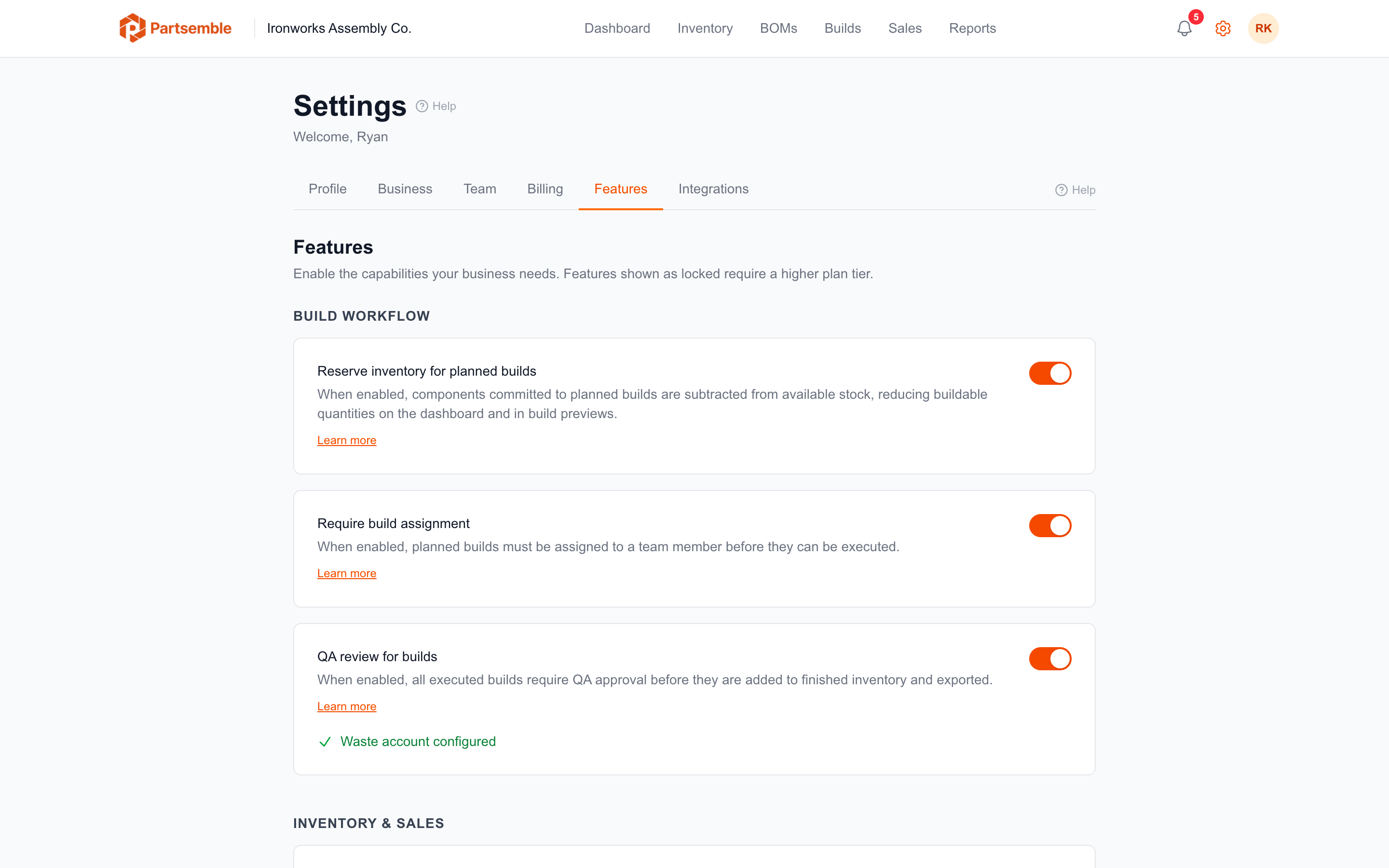
Available Toggles
QA Review (Pro plan)
When enabled, executed builds go through a review step before finished goods are added to inventory. A reviewer can approve the build (stock is added) or reject it with a reason and recovery mode. See Enabling QA Review.
Build Assignments (Pro plan)
When enabled, planned builds must be assigned to a team member before they can be executed. This adds accountability and helps coordinate who's responsible for which production runs. See Build Assignments.
Inventory Reservation (Pro plan)
When enabled, components committed to planned builds are reserved — subtracted from available stock when calculating buildable quantities. This prevents over-committing materials across multiple planned builds. See Build Queue.
Receiving (Advanced plan)
When enabled, Partsemble becomes the source of truth for inventory quantities. You create receipts to record incoming materials, which creates lots for FIFO tracking. This is a significant workflow change — you'll be asked to acknowledge the implications before enabling. See Enabling Receiving.
Enabling receiving changes how inventory is tracked. Review the implications carefully before turning it on.
Sales Tracking (Advanced plan)
When enabled, you can sync sales from your accounting system or create manual sales. Partsemble consumes finished good lots via FIFO and calculates margins. Receiving must be enabled first, since FIFO lot consumption drives cost calculations. See Enabling Sales Tracking.
Plan Requirements
Each toggle is gated to a minimum plan tier. If your plan doesn't include a feature, the toggle appears disabled with the required plan level shown. Upgrading your plan immediately unlocks the toggle.
| Feature | Required Plan |
|---|---|
| QA Review | Pro |
| Build Assignments | Pro |
| Inventory Reservation | Pro |
| Receiving | Advanced |
| Sales Tracking | Advanced |
Enabling and Disabling
Navigate to Settings → Features. Toggle any feature on or off. Changes take effect immediately. The manage_features permission is required.
Disabling a feature hides its UI but preserves all existing data. If you disable QA review, your past QA decisions are still recorded. If you disable receiving, your lots and receipts remain. Re-enabling restores access to everything.
Dependencies
Some features depend on others. Sales tracking requires receiving to be enabled first — if you try to enable sales tracking without receiving, you'll see an error explaining the dependency. Disable them in reverse order: sales tracking first, then receiving.