The AI Connector: Partsemble in Claude
The AI connector lets you ask Claude about the assembly work in one of your Partsemble businesses, and have Claude plan builds and draft transfers for someone to finish in Partsemble.
Why use it
You can ask what you can build today, what is running low or what a product costs in plain words, without opening reports. When Claude plans a build or drafts a transfer, it waits in Partsemble until a person checks it and runs it. Nothing reaches your books from Claude.
Before you start
- A Partsemble account with a business set up. If you do not have one yet, create an account and set up your business first, then connect from Claude. The sign-in page Claude opens links to Create an account too; once your business is set up, connect again from Claude.
- A Claude account that can add connectors.
Connecting Claude
- In Claude, open the connectors directory, find Partsemble and click Connect. To add it by address instead, add a custom connector with the address
https://mcp.partsemble.com/mcp. Claude's own guide to custom connectors shows where that is in Claude. - A Partsemble page opens. Sign in with your email and password, or with Google, if you are not signed in already.
- Check that the page names Claude (claude.ai) and says you will return to
claude.ai. - Under Business, choose the business Claude should reach. With one business, it is already chosen.
- Click Allow. Click Cancel instead to send Claude away without access.
You return to Claude, and it can now answer from that business's data.
Claude reaches the one business you chose. If you work for more than one business, connect again from Claude and choose the other one. Each business you allow becomes its own connected assistant, listed separately in Settings.
What you can ask
Ask in your own words. Claude can answer questions like these:
- What can I build right now, and what limits it? Claude lists each active BOM with how many units the stock on hand covers and the component that limits it, the same numbers as What Can I Build? on the dashboard. In Larkspur Coatings Co., Porch & Floor Enamel, Harbor Grey, 1 qt can be built 12 times, limited by Harbor Grey Tint Blend.
- Can I build a quantity, and what is short? Claude checks a quantity of one product against its active BOM and returns each component's required and available quantity, the shortages and the estimated cost.
- What is low? Components at or below their reorder point, and components with no reorder point that are blocking a build.
- Find a product. Stock on hand, reorder point, whether it is bought or built, and its unit cost and sale price.
- What goes into a product, and what does it cost? The product's active BOM: each component's quantity per unit, stock and cost, which components are optional or have a nested BOM, the cost lines, and the cost per unit.
- Which builds are planned and which have run? Builds newest first, with status, quantity, target date and who created or ran each.
- Which transfers have been made? Transfers newest first, with status, the containers each broke down and what it received into assembly inventory.
- Which conversions are set up? The external item a container comes from, what one container is called, and how much of which product one container yields.
When Claude names a record, it can give you a link. The link opens that record in Partsemble, in the business it belongs to. If you work for several businesses, Partsemble switches to that business. A link to a business you do not belong to opens in your current business.
What Claude can create
Claude can create two things, and both wait for a person to finish them in Partsemble.
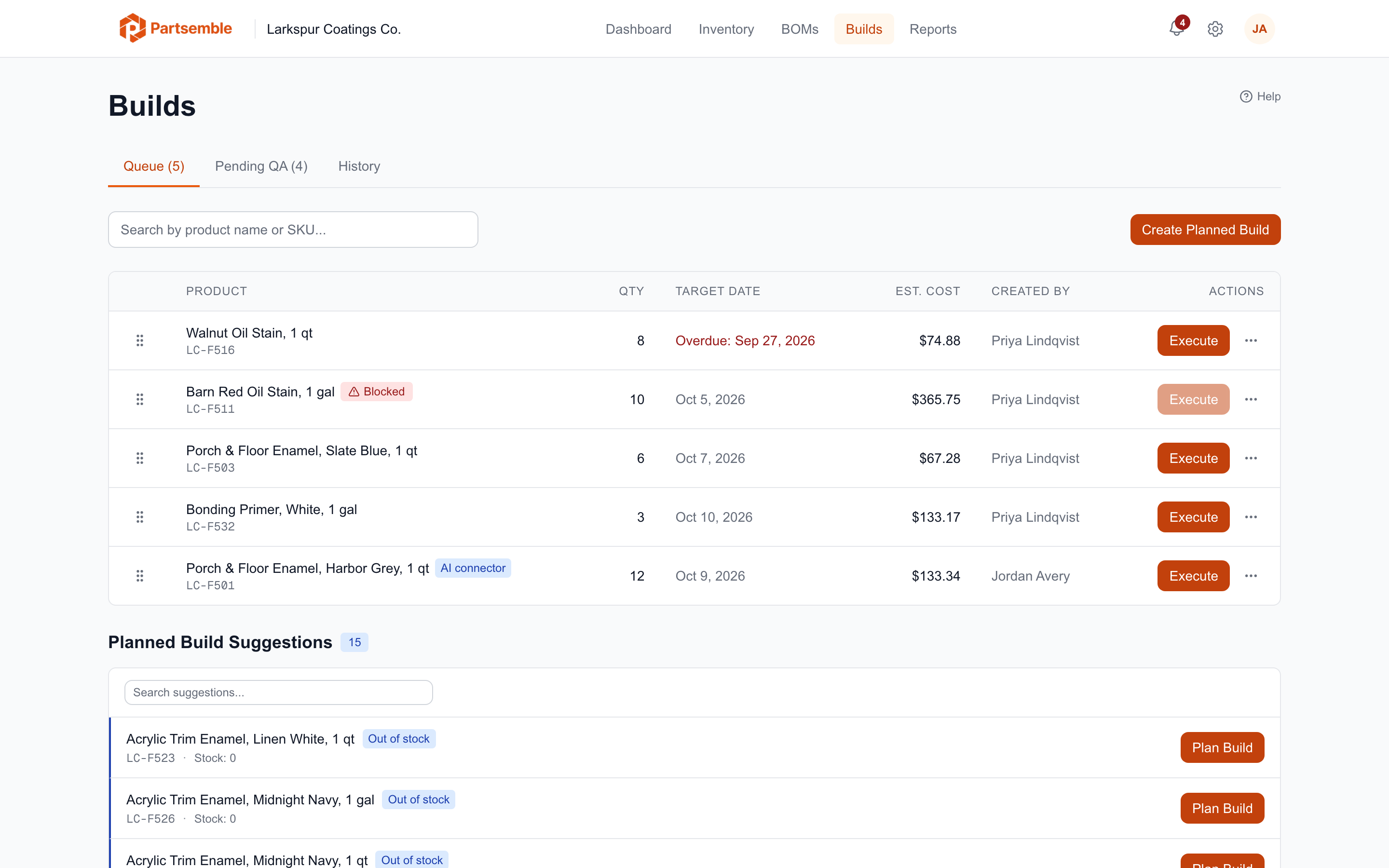
A planned build. Ask Claude to plan a build of a product for a quantity, with a target date and notes if you like. The planned build appears in the Build Queue marked AI connector. Nothing is consumed or exported until someone runs it.
A draft transfer. Ask Claude to transfer a number of containers through one or more of your conversions. The draft transfer appears in Inventory → Transfers → History with the status Draft, marked AI connector. Nothing leaves distribution stock and nothing is posted to your books. Someone opens it and runs it, edits it or discards it. When it runs, it is priced again at that day's cost, so a draft written last week does not post last week's price.
Claude cannot draft a transfer while Receiving is switched off, or while Export mode is set to inventory adjustments. If you ask for one then, Claude tells you why it cannot.
What Claude cannot do
Claude cannot:
- Run a build or a transfer
- Export anything, or mark anything exported
- Push products or suppliers to your accounting system
- Delete anything
- Send anything to QuickBooks Online or Xero
What Claude can see: your role and your plan
Claude acts as you, with your role in the business you chose. It can do only what you can do in Partsemble.
- Costs, prices and margins appear only if your role has View Costs, Prices & Margins. Without it, Claude's answers leave them out.
- What can I build needs View Dashboard.
- Checking a quantity and planning a build need Execute Builds.
- Products, BOMs, low stock and builds need View Products & Stock.
- Transfers and conversions need the Transfer feature, on the Advanced plan, and Create & Edit Receipts.
If your plan or your role does not include something, Claude does not have that ability. See Roles & Permissions for who has which permission.
A business whose accounting connection is Xero cannot have Claude draft transfers, because Xero cannot post the inventory adjustment a transfer needs to run. Claude can still answer questions about its transfers and conversions. A business with no accounting connection yet can draft.
Disconnecting
Go to Settings → Profile → AI connector. Under Connected assistants, each one shows the assistant, the business, when it was connected and when it was last used. Click Disconnect beside it and confirm. It loses access at once.
A connected assistant also ends when:
- An owner removes you from the business
- You reset your password with Forgot your password?
- It goes 30 days without being used
After any of these, Claude asks you to connect again.
Privacy
What Claude receives from Partsemble, what Partsemble stores about each connected assistant and how long it keeps its logs are in the AI Assistants section of the privacy policy.